How to Create Seasonal Ecommerce Campaign Images Online with GPT Image 2 AI
GPT Image 2 Team
May 10, 2026
A practical bilingual guide to planning, prompting, editing, exporting, and quality-checking seasonal ecommerce campaign images with GPT Image 2 AI Online.
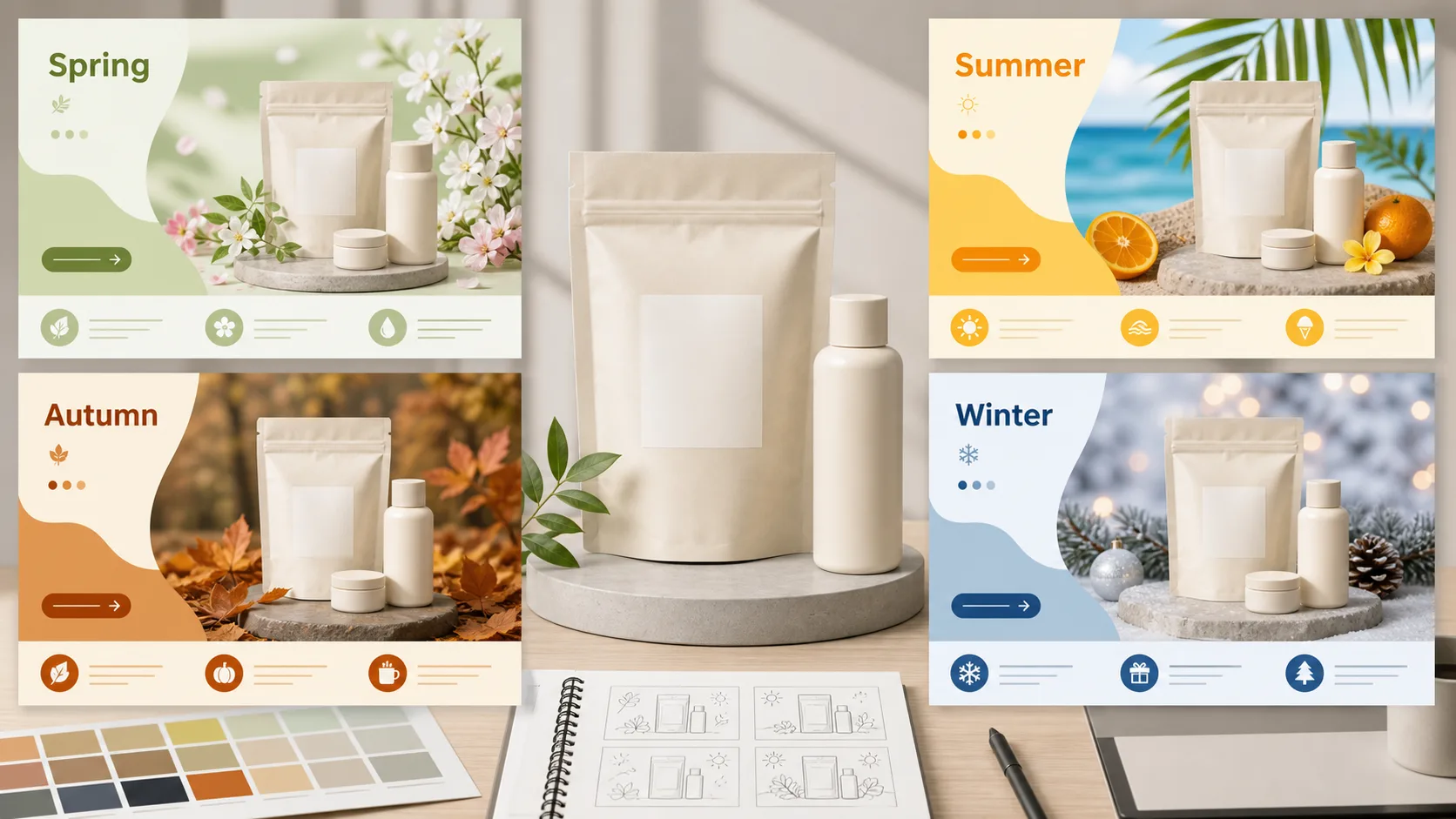
Seasonal ecommerce campaigns are visual operations, not just design exercises. A spring launch image, a summer drink promotion, a Black Friday product banner, and a Chinese New Year gift box key visual all need to do the same hard job: make the product clear, make the offer easy to understand, fit the channel, and still feel timely enough to earn attention.
GPT Image 2 AI Online can help with that work because it is strongest where ecommerce teams usually lose time: concepting multiple campaign directions, changing a product scene, creating product-on-white variants, exploring seasonal color systems, drafting multilingual layouts, and iterating on local image edits. The right expectation is important. Use GPT Image 2 AI as a high-output visual production assistant, not as a final legal, pricing, typography, or platform-compliance system.
The most reliable production pattern is simple: let AI create the image foundation, then use a design or editing tool for final text, prices, badges, legal copy, and exact platform layout. This keeps the speed advantage while avoiding the common failure modes of AI-generated campaign images: wrong text, drifting brand details, crowded layouts, or unsafe cropping.
This guide turns the research workflow into a practical blog-ready process for ecommerce teams using GPT Image 2 AI Online.
Where GPT Image 2 AI Fits in Ecommerce Campaign Production
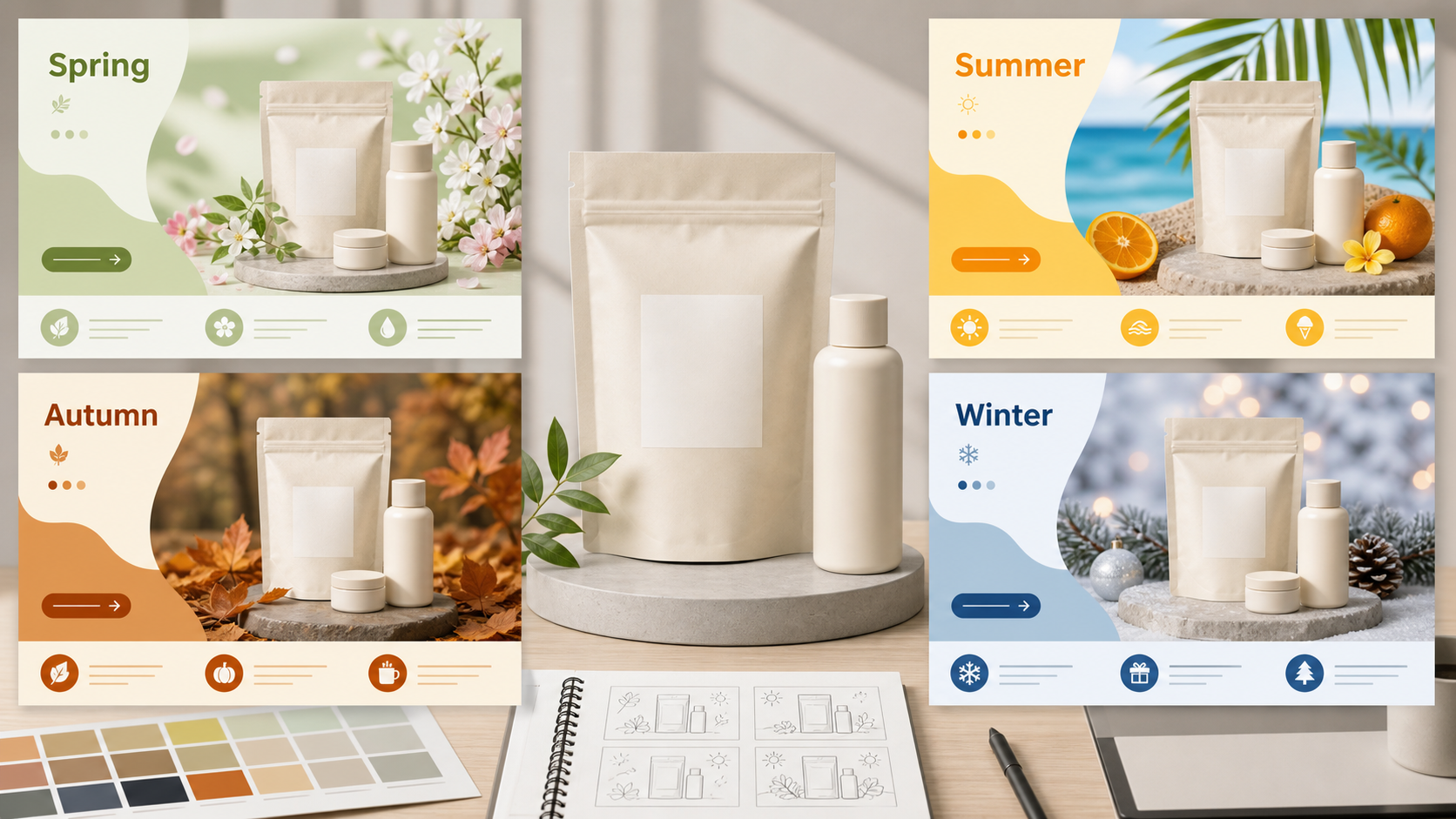
For seasonal ecommerce work, GPT Image 2 AI is most useful in the middle of the creative pipeline. It can quickly produce a range of visual directions before the team commits to final production. It can also help turn a single product image into multiple campaign settings: spring freshness, summer energy, autumn warmth, winter premium texture, Singles' Day urgency, Black Friday contrast, or Chinese New Year gifting.
Strong use cases include:
- Campaign backdrops for ecommerce hero banners and marketplace images.
- Product-on-white or clean product isolation drafts.
- Scene replacement, such as moving a skincare bottle into a spring bathroom setup.
- Seasonal style exploration across color, lighting, props, and composition.
- A/B image variants, such as product-only versus product-with-model.
- Draft posters with approximate text placement, later rebuilt in Figma, Canva, Photopea, or another layout tool.
- Format adaptation for 1:1, 3:4, and 16:9 placements.
The boundary is just as important. Do not rely on AI output as the final source of truth for prices, discount thresholds, legal disclaimers, SKU details, marketplace service promises, ingredient claims, certification marks, or brand names. Official image model guidance has repeatedly treated exact text, strict structured layout, and repeated brand consistency as areas that still require review. In ecommerce, those are not minor polish issues. They can become conversion problems, platform rejection problems, or compliance problems.
The practical rule: AI handles image generation and visual iteration. Humans and deterministic design tools handle final typography, product facts, offer logic, and compliance.
The Best Online Workflow: From Seasonal Brief to Upload-Ready Assets
Do not start with a magical prompt. Start with a brief. Seasonal campaign images work best when the commercial goal is already clear.
Before generating anything, define:
- Product or SKU family.
- Campaign season or event.
- Main channel, such as Shopify, Taobao/Tmall, JD, email, paid social, or homepage hero.
- Primary aspect ratios: usually 1:1, 3:4, and 16:9.
- One main selling point.
- Any required product features that must remain accurate.
- Safe areas for copy, badges, and price overlays.
- What must not appear, such as extra products, fake logos, unauthorized people, misleading claims, or text generated directly into the image.
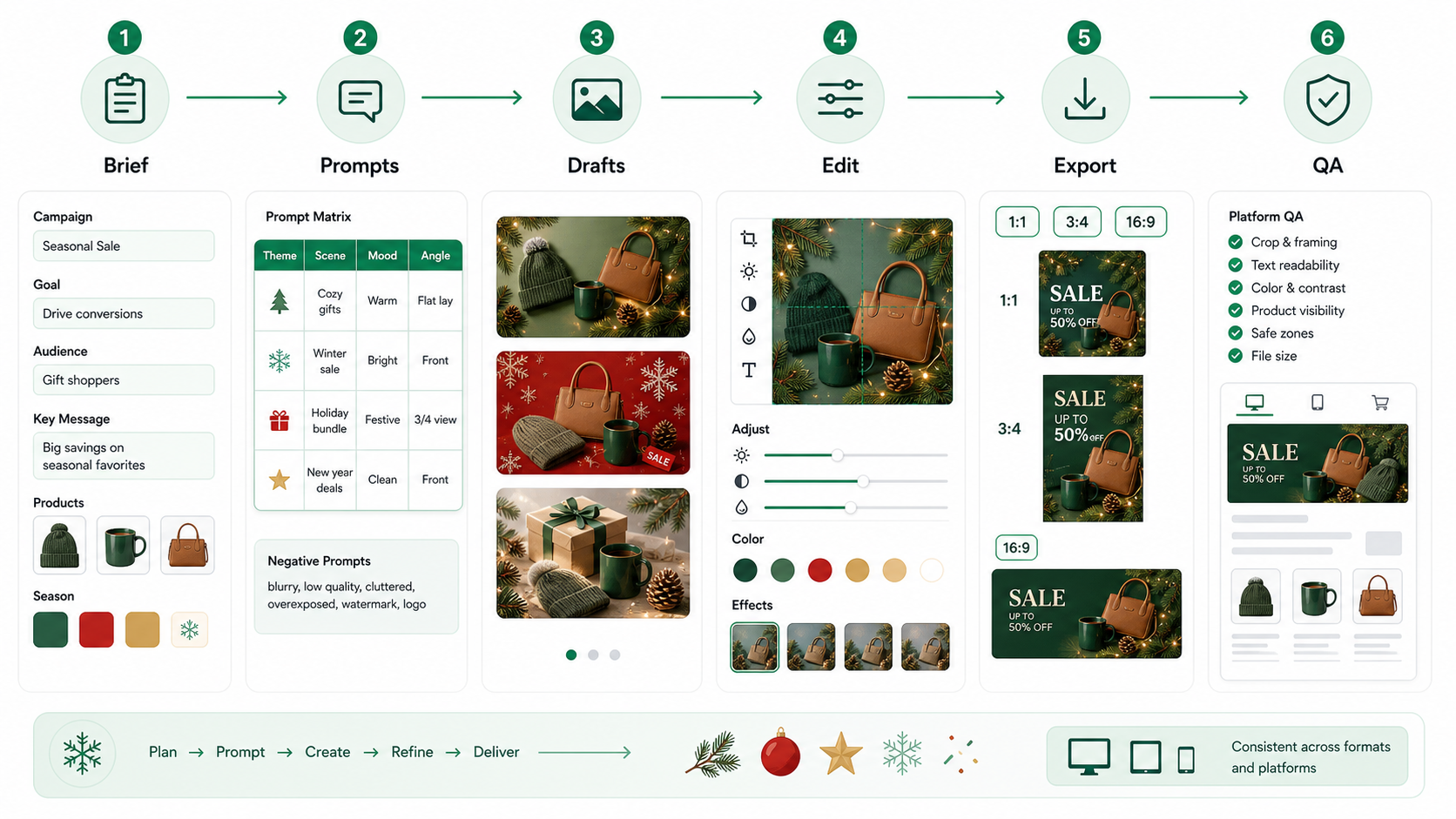
Once the brief is fixed, use this pipeline:
- Build a seasonal prompt matrix.
- Generate low-cost drafts in batches.
- Select one or two master images.
- Use image editing to fix composition, background, lighting, product position, or local defects.
- Produce white-background, scene-background, vertical, square, and horizontal versions.
- Add final text, price, CTA, badges, and legal copy in an external design tool.
- Export platform-specific files.
- Compress, preview, and quality-check before upload.
- Run A/B tests with one meaningful variable at a time.
This workflow is slower than pretending one prompt will deliver the final image, but faster in real production. It prevents the team from spending time repairing a weak concept. It also keeps the campaign assets organized: master image, editable layout, platform exports, compressed uploads, and test variants should not be mixed together.
A Prompt Framework for Seasonal Ecommerce Images
The safest prompt structure is not poetic. It is operational. Use the same eight-part structure every time:
- Use case and placement.
- Scene and season.
- Main product or person.
- Core selling point.
- Composition and negative space.
- Color and lighting.
- Must-keep elements.
- Exclusions and output requirements.
Here is the structure in a reusable prompt form:
Create a [placement] for [season/event] ecommerce campaign.
Scene: [seasonal environment, mood, props].
Main subject: [product/person], positioned [exact placement].
Selling point: visually communicate [one main benefit], without adding final promotional text.
Composition: reserve [percentage or area] clean negative space for later copy overlay.
Color and lighting: use [palette], [lighting style], [material or texture details].
Must keep: [product shape, label, color, packaging, logo accuracy, if using an input image].
Avoid: [extra products, misspelled text, watermark, fake platform badges, unauthorized logos, crowded background].
Output: [aspect ratio or size], realistic ecommerce-ready image, no final price text.
This structure matters because it makes debugging possible. If the image fails, you can see whether the problem came from the season, subject, composition, constraints, or output target. It also makes batch generation more consistent. You can reuse the structure across seasons instead of inventing a new prompt every time.
For draft generation, start with several variants instead of obsessing over one. A practical rhythm is 4 to 8 drafts per concept, then select the best one or two directions. Use lower quality settings for early drafts where available, then move to medium or high quality for final candidates. If you are using an API workflow, remember that size, quality, number of outputs, output format, compression, and moderation are the meaningful controls. Do not build a production process around unsupported or unstable assumptions such as a universal style parameter, seed-based reproducibility, or guaranteed transparent-background output.
If you need consistency, choose a master image and iterate from that image. Repeating the prompt from scratch is not the same as maintaining a campaign system.
Seasonal Design System for Ecommerce Campaigns
Seasonal images are not just about decorative props. Good ecommerce visuals translate seasonal expectations into conversion-friendly composition. The product still needs to be readable at mobile size. The offer area still needs to be clear. The image must survive cropping.
Use the following seasonal system as a production starting point, then adapt it to your brand.
| Season or Event | Color Direction | Composition | Typography Plan | A/B Variables |
|---|---|---|---|---|
| Spring | Cherry blossom pink, fresh green, cream white | Light atmosphere, soft morning light, product centered or slightly right, 30-40% clean copy space | Light sans serif or rounded sans serif in the final layout | Model vs product-only, pink-led vs green-led palette |
| Summer | Ocean blue, lemon yellow, white, deep navy contrast | High brightness, splash, ice, outdoor light, diagonal or wave movement | Bold sans serif, short headlines, large simple numbers | Cool ice feeling vs tropical warm feeling, close-up vs wider scene |
| Autumn | Caramel, wheat gold, deep brown, warm ivory | Layered textures, wood, fabric, leaves, warm window light | Serif headline plus simple sans serif support text | Lifestyle scene vs still life, premium low-density design vs promotion-heavy design |
| Winter | Deep blue, cold white, snow white, pale violet | Central product, glass, steam, reflection, subtle snow particles | Narrow sans serif or light serif, fewer words, generous spacing | Cool blue technology style vs red festive accent, glossy vs soft home lighting |
| Chinese New Year | Red, gold, ivory, refined festive accents | Symmetry, gift boxes, lattice, lantern, red envelope details, but avoid visual clutter | Modern Chinese-style serif or clean black type in post-production | Strong red-gold version vs premium cream-gold version, symbolic props vs minimal gift scene |
| Singles' Day | Black, red, white, yellow accent | High contrast, speed lines, angular geometry, clear product focus | Heavy compressed sans serif, hierarchy first | Large price zone vs large benefit zone, one badge vs multiple badges |
| Black Friday | Black, charcoal, silver white, gold | Spotlight, central product, minimal negative space, strong contrast | Uppercase bold sans serif in final design | Black-gold premium vs black-red urgency, single product vs product bundle |
These are not platform rules. They are visual production defaults. The job is to keep the product obvious while giving each campaign a seasonal reason to exist.
Prompt Examples You Can Adapt
Use these as starting points, not guaranteed outputs.
Spring Skincare Launch Hero
Spring skincare launch hero banner, cherry blossom pink and light green palette, single serum bottle centered slightly right, keep 35% clean negative space on the left for later copy overlay, real morning light, delicate glass reflections, very few petals, airy composition, no text, no watermark.Suggested use: homepage hero, paid social banner, new product launch page. Suggested format: horizontal 16:9 or 3:2 master, then crop to platform needs.
Summer Drink Campaign
Summer cold drink campaign visual, transparent sparkling beverage cup with clear ice cubes and condensation, blue-yellow contrast, portrait ecommerce composition, product occupies about 60% of frame, top area reserved for price overlay, strong summer sunlight, realistic photography, no extra products, no text.Suggested use: mobile feed, marketplace vertical image, summer promotion tile.
Autumn Knitwear Lookbook
Autumn knitwear campaign visual, caramel brown and ivory palette, half-body model wearing the knitwear, softly blurred wooden interior with warm window light, reserve copy space on the right, realistic fabric texture, no logo, no extra text, premium ecommerce photography.Suggested use: fashion collection launch, brand lookbook, social ad creative.
Winter Home Appliance Promo
Winter home appliance promo image, warm-white humidifier on a cool blue background, subtle snow particles and glass reflections, front-facing product centered, reserve CTA space at the bottom, clean premium look, realistic materials, no price text, no watermark.Suggested use: marketplace main image, product carousel, winter home campaign.
Chinese New Year Gift Box Key Visual
Chinese New Year gift box key visual, cream background with refined red-and-gold lattice details, premium gift box centered, subtle gold foil texture, festive but restrained mood, reserve brand area on top and campaign area below, no people, no busy background, no text.Suggested use: gifting category landing page, holiday hero image, product detail page banner.
Singles' Day Promotion Backdrop
Singles' Day campaign backdrop, black-red high contrast, one hero product in center, angular speed-line geometry in background, reserve large price-number area on top, reserve space for three feature badges at the bottom, aggressive ecommerce promo style, no real text, no watermark.Suggested use: high-intensity promotional image where final numbers and badges will be added later.
Product-on-White Edit Prompt
Extract the product from the input image and place it on a plain white opaque background. Center the product. Keep a crisp silhouette with no halo or fringing. Preserve product geometry, packaging color, and label legibility. Add only light polish and a subtle realistic contact shadow. Do not redesign the product.Suggested use: product listing images, marketplace uploads, clean secondary images.
Keep Text Out of the Generated Image Whenever Accuracy Matters
GPT Image 2 AI can create images that look like posters, ads, or multilingual layouts. That does not mean every piece of generated text is production-safe. For ecommerce, the final price, discount, CTA, coupon threshold, legal note, product claim, service promise, and platform badge should be added after generation.
The safest method is:
- Generate the image with clean copy space.
- Ask for "no text" or "no final promotional text" unless you are intentionally testing a headline concept.
- Add text in Figma, Canva, Photopea, Photoshop, or the ecommerce platform editor.
- Use brand fonts, approved colors, and locked offer copy.
- Export a flattened version for upload while keeping the editable layout file.
If you test AI-generated headline placement, treat it as a mockup. Rebuild the text before publishing. This is especially important for multilingual campaign images, where a phrase may look visually plausible but still be wrong, awkward, or inconsistent with the brand's approved wording.
Export and Platform Adaptation
A good ecommerce image system starts with a high-quality master and exports several platform versions. Do not create one image and hope every platform crop works.
For most seasonal campaign work, prepare:
- 1:1 square version for marketplace main images, grids, and social feeds.
- 3:4 vertical version for mobile-first listings, vertical recommendation slots, and product detail entry images.
- 16:9 or wide horizontal version for homepage heroes, collection banners, and ads.
- Product-on-white version when marketplace rules or listing clarity require it.
- Detail-page slices if the platform needs long-form product storytelling.
For Shopify-style storefronts, use high-resolution product imagery, consistent aspect ratios, and compressed delivery formats such as JPEG or WebP. A 2048x2048 square master is a practical baseline for many product images, while hero banners should be composed separately instead of relying on theme cropping.
For Taobao/Tmall-style use cases, do not assume one fixed pixel size applies forever. Public platform guidance has shown category-specific and scenario-specific validation, including 1:1 and 3:4 image requirements. Prepare both square and vertical masters, then export to the exact requirement shown in the current merchant backend or category schema.
For JD-style use cases, prepare at least three families: square main image, 3:4 long image, and detail-page images around the platform's current requirements. Public rule fragments have shown category variation, file-size limits, white-background preferences, and long-detail-image constraints. The safe operational habit is to check the current seller backend before upload.
The main point: platform upload limits are not the same as good frontend performance. Keep a high-quality archive master, then compress upload copies close to display size. Use JPEG or WebP for photographic campaign images. Use PNG only when you need sharper graphic edges or an editing pipeline that benefits from it.
Quality Control Before Publishing
Before any seasonal ecommerce image goes live, run a short QA checklist:
- Product shape, packaging, color, and label are accurate enough for the use case.
- No extra product variants appeared accidentally.
- No generated price, coupon, trademark, certification mark, or fake platform badge is present.
- Copy space is clean and not filled with visual noise.
- Product remains readable on mobile.
- Cropping works in 1:1, 3:4, and wide formats.
- Final text was added in a controlled design tool.
- File size is reasonable after compression.
- The image does not imply unsupported claims, official platform endorsement, or unavailable product features.
- You have rights to all input images, product photos, model photos, brand assets, and logos used.
If you are using uploaded model images, influencer images, packaging art, competitor visuals, or third-party brand marks, confirm usage rights first. Do not use AI editing to turn a person into an advertising subject without consent. Do not put unauthorized logos into a commercial campaign. Do not use a platform badge or official-looking language unless the claim is real and allowed.
AI-generated image metadata and provenance systems can help with traceability, but they are not a compliance shield. Screenshots, resizing, and re-encoding may remove metadata. A missing credential does not prove an image was not AI-generated, and a credential does not remove your responsibility to review the asset.
A/B Testing: Test Fewer Things, Learn More
Seasonal campaigns often fail because teams test too many visual changes at once. If one version has a different color palette, a larger product, a model, more badges, a new price style, and a different crop, the result will not tell you much.
Test one high-impact variable at a time:
- Product size: 55% of frame versus 75%.
- Product-only versus product-with-person.
- Clean background versus lifestyle scene.
- Single benefit versus multiple benefit badges.
- 1:1 square versus 3:4 vertical.
- Cool palette versus warm palette.
- AI-drafted headline concept versus professionally typeset final headline.
For aggressive sale events, test whether one large benefit beats a crowded information board. For brand-led seasonal launches, test whether a product close-up beats a lifestyle scene. These tests are more useful than endlessly swapping style adjectives.
Final Takeaway
GPT Image 2 AI Online is valuable for seasonal ecommerce because it helps teams create more campaign directions, faster. Its best role is not replacing the whole design process. Its best role is restructuring that process: structured brief, prompt matrix, low-cost drafts, master image selection, image editing, external typography, multi-size export, compression, platform QA, and focused A/B testing.
Use it for visual speed. Keep final text, rights checks, platform rules, and commercial claims under human control. That is the difference between a fast image and a usable ecommerce asset.